Software Implementation in Matlab
In Matlab or Octave, this type of filter can be implemented using the filter function. For example, the following matlab4.1 code computes the output signal y given the input signal x for a specific example comb filter:
g1 = (0.5)^3;        % Some specific coefficients
g2 = (0.9)^5;
B = [1 0 0 g1];      % Feedforward coefficients, M1=3
A = [1 0 0 0 0 g2];  % Feedback coefficients, M2=5
N = 1000;            % Number of signal samples
x = rand(N,1);       % Random test input signal
y = filter(B,A,x);   % Matlab and Octave compatible
The example coefficients,
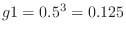 and
and
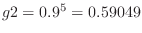 , are chosen to place all filter zeros at radius
  and all
filter poles at radius
and all
filter poles at radius  in the complex
  plane (as we shall see
below).
plane (as we shall see
below).
The matlab filter function carries out the following computation
for each element of the y array:


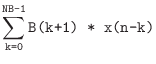

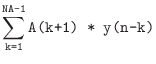
for
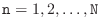 , where NA = length(A)
and NB = length(B). Note that the indices of x and
y can go negative in this expression. By default, such terms
are replaced by zero. However, the filter function has an
optional fourth argument for specifying the initial state of
the filter, which includes past input and past output samples seen by
the filter. This argument is used to forward the filter's state
across successive blocks of data:
, where NA = length(A)
and NB = length(B). Note that the indices of x and
y can go negative in this expression. By default, such terms
are replaced by zero. However, the filter function has an
optional fourth argument for specifying the initial state of
the filter, which includes past input and past output samples seen by
the filter. This argument is used to forward the filter's state
across successive blocks of data:[y1,state] = filter(B,A,x1); % filter 1st block x1 [y2,state] = filter(B,A,x2,state); % filter 2nd block x2 ...
Sample-Level Implementation in Matlab
For completeness, a direct matlab implementation of the built-in
filter function (Eq. (3.3)) is given in Fig.3.2.
While this code is useful for study, it is far slower than the
built-in filter function. As a specific example, filtering
(3.3)) is given in Fig.3.2.
While this code is useful for study, it is far slower than the
built-in filter function. As a specific example, filtering
 samples of data using an order 100 filter on a 900MHz Athlon
PC required 0.01 seconds for filter and 10.4 seconds for
filterslow. Thus, filter was over a thousand times
faster than filterslow in this case. The complete test is
given in the following matlab listing:
samples of data using an order 100 filter on a 900MHz Athlon
PC required 0.01 seconds for filter and 10.4 seconds for
filterslow. Thus, filter was over a thousand times
faster than filterslow in this case. The complete test is
given in the following matlab listing:
x = rand(10000,1); % random input signal
B = rand(101,1);   % random coefficients
A = [1;0.001*rand(100,1)]; % random but probably stable
tic; yf=filter(B,A,x); ft=toc
tic; yfs=filterslow(B,A,x); fst=toc
The execution times differ greatly for two reasons:
- recursive feedback cannot be ``vectorized'' in general, and
- built-in functions such as filter are written in C, precompiled, and linked with the main program.
function [y] = filterslow(B,A,x)
% FILTERSLOW: Filter x to produce y = (B/A) x .
%       Equivalent to 'y = filter(B,A,x)' using
%       a slow (but tutorial) method.

NB = length(B);
NA = length(A);
Nx = length(x);

xv = x(:); % ensure column vector

% do the FIR part using vector processing:
v = B(1)*xv;
if NB>1
  for i=2:min(NB,Nx)
    xdelayed = [zeros(i-1,1); xv(1:Nx-i+1)];
    v = v + B(i)*xdelayed;
  end;
end; % fir part done, sitting in v

% The feedback part is intrinsically scalar,
% so this loop is where we spend a lot of time.
y = zeros(length(x),1); % pre-allocate y
ac = - A(2:NA);
for i=1:Nx, % loop over input samples
  t=v(i);   % initialize accumulator
  if NA>1,
    for j=1:NA-1
      if i>j,
        t=t+ac(j)*y(i-j);
      %else y(i-j) = 0
      end;
    end;
  end;
  y(i)=t;
end;

y = reshape(y,size(x)); % in case x was a row vector
|
Next Section:
Software Implementation in C++
Previous Section:
Signal Flow Graph