How to Obtain Biquad Coefficients
 Started by 6 years ago●11 replies●latest reply 6 years ago●1507 views
I recently inquired about A & C weighted filters. While researching how to generate A & C filters using MatLab (which I know absolutely nothing about. Sadly, I am just borrowing code), I found code that generates coefficients for these weighted filters. They all generate output from bilinear transform. In my research I found that the output from the bilinear transform can be converted to second order sections using tf2sos, which is exactly what I want. One of my sticking points is that when I generated those second order sections (a0, a1, a2, b0, b1, b2), the b0 did not equal 1 as I expected.
The usage of tf2sos would be perfect but what I found is that values generated create 6 coefficients (a0, a1, a2, b0, b1, b2) , however what I need is 5 (a0, a1, a2, b1, b2). I do know naming conventions differ but I am still referring to the same thing whether you call them a or b. What I understand is that a normalization of required to make the b0 = 1 in (a0, a1, a2, b0, b1, b2), leaving the final result as (a0, a1, a2, b1, b2).
How do I get to the point where I can obtain the 5 coefficients
[b,a] = bilinear(NUM,DEN,Fs);
sos = tf2sos(b,a);
printf('%0.16f\n',sos);
(robert bristow-johnson)https://www.dsprelated.com/showthread/comp.dsp/693...
https://www.dsprelated.com/showcode/214.php
https://www.dsprelated.com/showcode/215.php
Thank you,
MrE

Divide every coefficient by \(b_0\), i.e. \(a_0' = \frac{a_0}{b_0}\), \(b_1' = \frac{b_1}{b_0}\), etc.. The resulting \(b_0'\) will be equal to 1. Assuming the routine does what's expected, you should be good to go with the new set of coefficients.
Excellent. I thought I'd seen this before (dividing everything by b0).
>>Assuming the routine does what's expected...
You're absolutely right. I really dont know. Those second order section coefficients really looked odd. I'm hoping to test this out tonight and practically praying for a mini-miracle.

Hi,
For a biquad, the feedback coeffs are [1 a1 a2] and the feedforward coeffs are [b0 b1 b2]. The a0 coefficient does not appear explicitly in the filter structure. The tf2sos *may* be normalizing the b's such that the gain at dc is 1.0 -- which may be why b0 is not equal to one.
For more on lowpass biquads, see my recent post: https://www.dsprelated.com/showarticle/1137.php
regards,
Neil
I hadn't considered there may be something else occurring with b0. I'll check out your article. Unfortunately, I am math challenged (gleaning rather than consuming) but I continue to try to understand.
D'oh. Too much Scilab -- Scilab just gives you transfer functions, not anonymous arrays of coefficients.
After a lot of thinking and reading, I determined that I misunderstood the array output order of the ts2sos function. I converted the output order to the order which I planned to use. Even though I learned the naming convention differently, for clarity, I will stick with [b0, b1, b2, 1, a1, a2] where a0 = 1.
All looked like it was going well until I produced the output and saw that start around 6300Hz using a 44100 sampling frequency (48000Hz sampling was not much difference)things start to go awry. My test frequencies, at 1/3 octave frequencies, has as much as 27 decibel difference. I apply a 2.76234698295594 offset to compensate to 0.0 db at 1000Hz. Is this what I should expect. Just in case it matters, I am using Octave online https://octave-online.net/ to produce get the biquad coefficients.
Thank you,
MrE
%Sampling Rate
%Fs = 48000;
Fs = 44100;
%Analog A-weighting filter according to IEC/CD 1672.
f1 = 20.598997;
f2 = 107.65265;
f3 = 737.86223;
f4 = 12194.217;
A1000 = 1.9997;
pi = 3.14159265358979;
NUM = [ (2*pi*f4)^2*(10^(A1000/20)) 0 0 0 0 ];
DEN = conv([1 +4*pi*f4 (2*pi*f4)^2],[1 +4*pi*f1 (2*pi*f1)^2]);
DEN = conv(conv(DEN,[1 2*pi*f3]),[1 2*pi*f2]);
%Bilinear transformation of analog design to get the digital filter.
% bilinear(NUM,DEN,1/Fs) — where 1/Fs is what Octave expects vs MatLab FS
[b,a] = bilinear(NUM,DEN,1/Fs);
sos = tf2sos(b,a);
printf('%0.16f\n',sos);
%output of tf2sos
0.25574112520425761.0000000000000000
1.0000000000000000
-0.5114387219173979
-2.0001702052850550
2.0000000000000018
0.2556976004164214
1.0001702197743114
1.0000000000000016
1.0000000000000000
1.0000000000000000
1.0000000000000000
-0.1405360824207118
-1.8849012174682307
-1.9941388812268852
0.0049375976155401
0.8864214718516013
0.9941474694047874
reordered array output for my function [b0, b1, b2,1, a1, a2]
ax = [1.0000000000000000, -2.0001702052850550, 1.0001702197743114, 1.0000000000000000, -1.8849012174682307, 0.8864214718516013]
ax = [1.0000000000000000, 2.0000000000000018, 1.0000000000000016, 1.0000000000000000, -1.9941388812268852, 0.9941474694047874]
indx freq expectedDB coeffResultDB error (expectedDB-coeffResultDB)
1. 20.0 -50.394855 -48.395002 -1.999854
2. 25.0 -44.820693 -43.027185 -1.793509
3. 31.5 -39.529064 -37.922292 -1.606772
4. 40.0 -34.539447 -33.105356 -1.434091
5. 50.0 -30.275178 -28.981509 -1.293669
6. 63.0 -26.223024 -25.061738 -1.161285
7. 80.0 -22.397865 -21.367662 -1.030203
8. 100.0 -19.145152 -18.231199 -0.913954
9. 125.0 -16.189851 -15.386256 -0.803595
10. 160.0 -13.244525 -12.551357 -0.693168
11. 200.0 -10.847252 -10.242894 -0.604357
12. 250.0 -8.675022 -8.151094 -0.523929
13. 315.0 -6.643962 -6.199715 -0.444247
14. 400.0 -4.774080 -4.414373 -0.359708
15. 500.0 -3.247992 -2.972832 -0.275159
16. 630.0 -1.908628 -1.726412 -0.182216
17. 800.0 -0.794769 -0.709600 -0.085169
18. 1000.0 0.000000 0.000000 -0.000000
19. 1250.0 0.576176 0.500284 0.075892
20. 1600.0 0.993092 0.848173 0.144919
21. 2000.0 1.201699 1.005786 0.195914
22. 2500.0 1.271104 1.016600 0.254504
23. 3150.0 1.201781 1.605448 -0.403667
24. 4000.0 0.964229 0.627635 0.336594
25. 5000.0 0.555465 0.162086 0.393379
26. 6300.0 -0.113951 8.166050 -8.280001
27. 8000.0 -1.144507 0.656249 -1.800757
28. 10000.0 -2.488333 9.699220 -12.187553
29. 12500.0 -4.249819 5.350868 -9.600686
30. 16000.0 -6.700912 4.426299 -11.127211
31. 20000.0 -9.340763 17.277129 -26.617892
I noticed there is some Matlab code for the A-weighted filter in a DSPrelated post from 2011:
https://www.dsprelated.com/showcode/214.php
Here is the code, with the resulting coeffs. I added plotting. See figure below. Note this is a 6th order filter.
%Aweighted.m
%Sampling Rate
Fs = 48000;
%Analog A-weighting filter according to IEC/CD 1672.
f1 = 20.598997;
f2 = 107.65265;
f3 = 737.86223;
f4 = 12194.217;
A1000 = 1.9997;
pi = 3.14159265358979;
NUM = [ (2*pi*f4)^2*(10^(A1000/20)) 0 0 0 0 ];
DEN = conv([1 +4*pi*f4 (2*pi*f4)^2],[1 +4*pi*f1 (2*pi*f1)^2]);
DEN = conv(conv(DEN,[1 2*pi*f3]),[1 2*pi*f2]);
%Bilinear transformation of analog design to get the digital filter.
[b,a] = bilinear(NUM,DEN,Fs)
% plot response
[h,f]= freqz(b,a,4096,Fs);
H= 20*log10(abs(h));
semilogx(f,H),grid
axis([0 Fs/2 -60 10])
xlabel('Hz'),ylabel('dB')
title('A-weighted filter')
b =0.2343 -0.4686 -0.2343 0.9372 -0.2343 -0.4686 0.2343
a =1.0000 -4.1130 6.5531 -4.9908 1.7857 -0.2462 0.0112
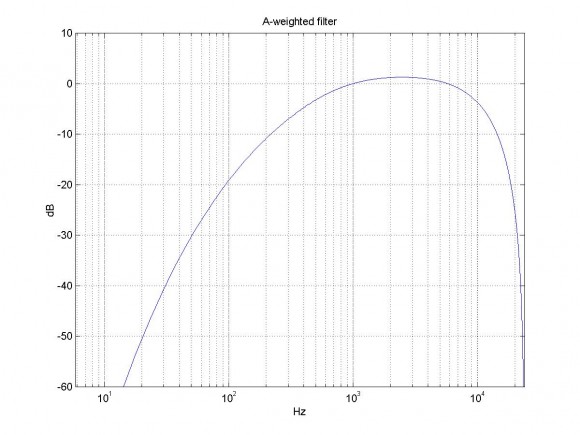
I used the same code base. https://www.dsprelated.com/showcode/214.php
I believe that if my method for determining the error rate were incorrect then it would have shown up previously in the last few years.
I cant say that I understand the graph, however what I applied pure tones to the filter in 1/3 octaves and determined the error in decibels. A less than 1db error is what I'm aiming for. In my previous post using the derived coefficients, we start out with a ~2db error and start getting better until we get to 6300Hz with an 8db error to ~27db error as 20KHz. If that is the actual error difference that I should expect, then I just have to try something different.
MrE

Hello,
You've likely already found the issue with your script-file, but the third argument to the "bilinear" function should be "Fs" not "1/Fs". With this change your code produces the same A-weighted response generated by the code offered by NEIROBER.
Using the "b" and "a" coefficients and the TF2SOS function, the frequency-magnitude response of the SOS matrix can be plotted.
sos = tf2sos(b, a, 'up', 'none');
figure;
     [h, f]=freqz(sos, 4096, Fs); plot(f, 20*log10(abs(h))); grid on; shg;
     set(gca, 'XScale', 'log');
The values in the SOS matrix are,
sos =


   0.234301792299513   0.468603584599026   0.234301792299513   1.000000000000000  -1.893870494746436   0.895159769115844
   1.000000000000000  -2.000230909187332   1.000230935849392   1.000000000000000  -1.994614455969653   0.994621706990548
   1.000000000000000  -1.999769090812668   0.999769117469660   1.000000000000000  -0.224558458059779   0.012606625271547
Michael.
The use of "1/FS" was intentional because I do not have access to MatLab but rather I have been utilizing Octave online (https://octave-online.net) and the tf2sos function utilizes the period instead of the sampling rate in the third argument but otherwise is the same.
MrE
Very good.